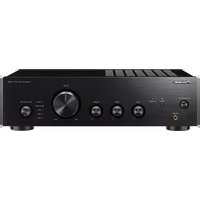
VSX-422, VSX-422-K - AV receiver PIONEER - Free user manual and instructions
Find the device manual for free VSX-422, VSX-422-K PIONEER in PDF.



| Product Type | 5.1-channel audio-video receiver |
| Brand | PIONEER |
| Model | VSX-422 / VSX-422-K |
| Output Power | 100 W per channel (6 ohms, 1 kHz, 1% THD) |
| Number of Channels | 5.1 |
| HDMI Inputs | 3 inputs, 1 output |
| Digital Audio Inputs | 2 optical, 1 coaxial |
| Analog Audio Inputs | 4 stereo line inputs (RCA) |
| Speaker Outputs | 5 pairs of screw terminals (A/B) |
| Subwoofer Output | 1 subwoofer pre-out |
| Supported Audio Formats | Dolby Digital, DTS, Dolby Pro Logic II |
| FM/AM Radio | FM/AM with 30 presets |
| Dimensions (W x H x D) | 435 x 148 x 328 mm |
| Weight | 8.0 kg |
| Power Consumption | 310 W (standby: 0.6 W) |
| Power Supply | 220-240 V ~ 50/60 Hz |
| Included Accessories | Remote control, batteries, FM antenna, AM loop antenna, user manual |
| Care and Cleaning | Clean with a soft dry cloth. Do not use solvents or abrasive products. |
| Safety | Unplug the unit during thunderstorms. Do not block ventilation slots. |
Frequently Asked Questions - VSX-422, VSX-422-K PIONEER
User questions about VSX-422, VSX-422-K PIONEER
0 question about this device. Answer the ones you know or ask your own.
Ask a new question about this device
Download the instructions for your AV receiver in PDF format for free! Find your manual VSX-422, VSX-422-K - PIONEER and take your electronic device back in hand. On this page are published all the documents necessary for the use of your device. VSX-422, VSX-422-K by PIONEER.
USER MANUAL VSX-422, VSX-422-K PIONEER
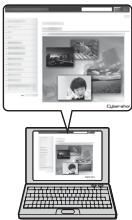
Learning more about the camera ("Cyber-shot User Guide")
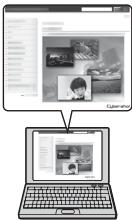
"Cyber-shot User Guide" is an on-line manual. Refer to it for in-depth instructions on the many functions of the camera.
① Access the Sony support page.
http://www.roy.net/SonyInfo/Support/
② Select your country or region.
③ Search for the model name of your camera within the support page.
- Check the model name on the bottom of your camera.
Checking the supplied items
The number in parentheses indicates the number of pieces.
- Camera (1)
- Rechargeable battery pack NP-BX1 (1)
- Micro USB cable (1)
- AC Adaptor AC-UB10/UB10B/UB10C/UB10D (1)
- Power cord (mains lead) (not supplied in the USA and Canada) (1)
- Wrist strap (1)
- Instruction Manual (this manual) (1)
Owner's Record
The model and serial numbers are located on the bottom. Record the serial number in the space provided below. Refer to these numbers whenever you call your Sony dealer regarding this product.
Model No. DSC-WX300
Serial No.
Model No. AC-UB10/AC-UB10B/AC-UB10C/AC-UB10D
Serial No.
GB
WARNING
To reduce fire or shock hazard, do not expose the unit to rain or moisture.
IMPORTANT SAFETY INSTRUCTIONS -SAVE THESE INSTRUCTIONS DANGER
TO REDUCE THE RISK OF FIRE OR ELECTRIC SHOCK, CAREFULLY FOLLOW THESE INSTRUCTIONS
If the shape of the plug does not fit the power outlet, use an attachment plug adaptor of the proper configuration for the power outlet.
CAUTION
Battery pack
If the battery pack is mishandled, the battery pack can burst, cause a fire or even chemical burns. Observe the following cautions.
- Do not disassemble.
- Do not crush and do not expose the battery pack to any shock or force such as hammering, dropping or stepping on it.
- Do not short circuit and do not allow metal objects to come into contact with the battery terminals.
- Do not expose to high temperature above 60^ (140^) such as in direct sunlight or in a car parked in the sun.
- Do not incinerate or dispose of in fire.
-
Do not handle damaged or leaking lithium ion batteries.
-
Be sure to charge the battery pack using a genuine Sony battery charger or a device that can charge the battery pack.
- Keep the battery pack out of the reach of small children.
- Keep the battery pack dry.
- Replace only with the same or equivalent type recommended by Sony.
- Dispose of used battery packs promptly as described in the instructions.
1 AC Adaptor
Use the nearby wall outlet (wall socket) when using the AC Adaptor. Disconnect the AC Adaptor from the wall outlet (wall socket) immediately if any malfunction occurs while using the apparatus.
The power cord (mains lead), if supplied, is designed specifically for use with this camera only, and should not be used with other electrical equipment.
For Customers in the U.S.A. and Canada
I RECYCLING LITHIUM-ION BATTERIES
Lithium-Ion batteries are recyclable.
You can help preserve our environment by returning your used rechargeable batteries to the collection and recycling location nearest you.
For more information regarding recycling of rechargeable batteries, call toll free
1-800-822-8837, or visit http://www.rbrc.org/

Caution: Do not handle damaged or leaking Lithium-Ion batteries.
Battery pack
This device complies with Part 15 of the FCC Rules. Operation is subject to the following two conditions:
(1) This device may not cause harmful interference, and (2) this device must accept any interference received, including interference that may cause undesired operation.
This Class B digital apparatus complies with Canadian ICES-003.
This equipment complies with FCC/IC radiation exposure limits set forth for an uncontrolled environment and meets the FCC radio frequency (RF) Exposure Guidelines in Supplement C to OET65 and RSS-102 of the IC radio frequency (RF) Exposure rules. This equipment has very low levels of RF energy that are deemed to comply without testing of specific absorption ratio (SAR).
For Customers in the U.S.A.
UL is an internationally recognized safety organization. The UL Mark on the product means it has been UL Listed.
If you have any questions about this product, you may call: Sony Customer Information Center 1-800-222-SONY (7669) The number below is for the FCC related matters only.
Regulatory Information
Declaration of Conformity
Trade Name:SONY
Model No.:DSC-WX300
Responsible Party: Sony Electronics Inc.
Address: 16530 Via Esprillo, San Diego, CA 92127 U.S.A.
TelephoneNo.:858-942-2230
This device complies with Part15 of the FCC Rules. Operation is subject to the following two conditions: (1) This device may not cause harmful interference, and (2) this device must accept any interference received, including interference that may cause undesired operation.
This equipment must not be co-located or operated in conjunction with any other antenna or transmitter.
CAUTION
You are cautioned that any changes or modifications not expressly approved in this manual could void your authority to operate this equipment.
I Note:
This equipment has been tested and found to comply with the limits for a Class B digital device, pursuant to Part 15 of the FCC Rules.
These limits are designed to provide reasonable protection against harmful interference in a residential installation. This equipment generates, uses, and can radiate radio frequency energy and, if not installed and used in accordance with the instructions, may cause harmful interference to radio communications. However, there is no guarantee that interference will not occur in a particular installation. If this equipment does cause harmful interference to radio or television reception, which can be determined by turning the equipment off and on, the user is encouraged to try to correct the interference by one or more of the following measures:
- Reorient or relocate the receiving antenna.
- Increase the separation between the equipment and receiver.
- Connect the equipment into an outlet on a circuit different from that to which the receiver is connected.
- Consult the dealer or an experienced radio/TV technician for help.
The supplied interface cable must be used with the equipment in order to comply with the limits for a digital device pursuant to Subpart B of Part 15 of FCC Rules.
For Customers in Canada
This device complies with Industry Canada licence-exempt RSS standard(s). Operation is subject to the following two conditions: (1) this device may not cause interference, and (2) this device must accept any interference, including interference that may cause undesired operation of the device.
For Customers in Europe
CE
Hereby, Sony Corporation, declares that this DSC-WX300 Digital Still Camera is in compliance with the essential requirements and other relevant provisions of the Directive 1999/5/EC. For details, please access the following URL: http://www.compliance.sony.de/
I Notice for the customers in the countries applying EU Directives
This product has been manufactured by or on behalf of Sony Corporation, 1-7-1 Konan Minato-ku Tokyo, 108-0075 Japan. Inquiries related to product compliance based on European Union legislation shall be addressed to the authorized representative, Sony Deutschland GmbH, Hedelfinger Strasse 61, 70327 Stuttgart, Germany. For any service or guarantee matters, please refer to the addresses provided in the separate service or guarantee documents.
This product has been tested and found compliant with the limits set out in the EMC regulation for using connection cables shorter than 3 meters (9.8 feet).
Attention
The electromagnetic fields at the specific frequencies may influence the picture and sound of this unit.
Notice
If static electricity or electromagnetism causes data transfer to discontinue midway (fail), restart the application or disconnect and connect the communication cable (USB, etc.) again.
Disposal of Old Electrical & Electronic Equipment (Applicable in the European Union and other European countries with separate collection systems)

This symbol on the product or on its packaging indicates that this product shall not be treated as household waste. Instead it shall be handed over to the applicable collection point for the recycling of electrical and electronic equipment. By ensuring this product is disposed of correctly, you will help prevent potential negative consequences for the environment and human health, which could otherwise be caused by inappropriate waste handling of this product. The recycling of materials will help to conserve natural resources. For more detailed information about recycling of this product,
please contact your local Civic Office, your household waste disposal service or the shop where you purchased the product.
Disposal of waste batteries (applicable in the European Union and other European countries with separate collection systems)

This symbol on the battery or on the packaging indicates that the battery provided with this product shall not be treated as household waste. On certain batteries this symbol might be used in combination with a chemical symbol. The chemical symbols for mercury (Hg) or lead (Pb) are added if the battery contains more than 0.0005% mercury or 0.004% lead. By ensuring these batteries are disposed of correctly, you will help prevent
potentially negative consequences for the environment and human health which could otherwise be caused by inappropriate waste handling of the battery. The recycling of the materials will help to conserve natural resources.
In case of products that for safety, performance or data integrity reasons require a permanent connection with an incorporated battery, this battery should be replaced by qualified service staff only. To ensure that the battery will be treated properly, hand over the product at end-of-life to the applicable collection point for the recycling of electrical and electronic equipment.
For all other batteries, please view the section on how to remove the battery from the product safely.
Hand the battery over to the applicable collection point for the recycling of waste batteries. For more detailed information about recycling of this product or battery, please contact your local Civic Office, your household waste disposal service or the shop where you purchased the product.
Notice for customers in the United Kingdom
A moulded plug complying with BS 1363 is fitted to this equipment for your safety and convenience.
Should the fuse in the plug supplied need to be replaced, a fuse of the same rating as the supplied one and approved by ASTA or BSI to BS 1362, (i.e., marked with an 艹 or 艹 mark) must be used.
If the plug supplied with this equipment has a detachable fuse cover, be sure to attach the fuse cover after you change the fuse. Never use the plug without the fuse cover. If you should lose the fuse cover, please contact your nearest Sony service station.
For Customers in Singapore
Complies with
IDA Standards
DB00353
Identifying parts
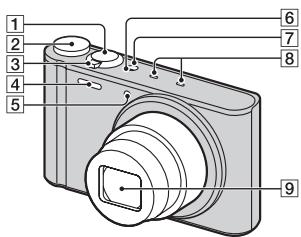
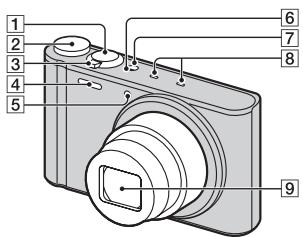
1 Shutter button
2 Mode dial
i (Intelligent Auto)/
i ^+ (Superior Auto)/
P(Program Auto)/
i (iSweep Panorama)/
(Movie Mode)/
3D(3D Still Image)/
SCN(Scene Selection)/
Background Defocus
For shooting: W/T (Zoom) lever For viewing: (Index) lever/ (Playback zoom) lever
4 Flash
Self-timer lamp/Smile Shutter lamp/AF illuminator
Charge lamp
7 ON/OFF (Power) button
8 Microphone
9 Lens
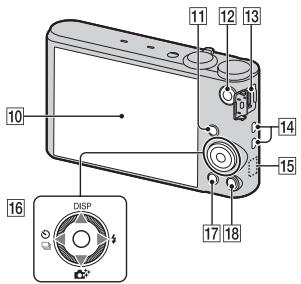
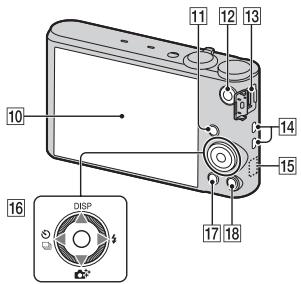
10 LCD screen
11 (Playback) button
MOVIE (Movie) button
13 Multi/Micro USB Terminal*
14 Hook for wrist strap
[15] Wi-Fi receiver (built-in)
16 Control wheel
17 MENU button
18 ?/In-Camera Guide/Delete) button
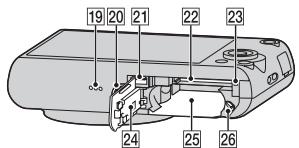
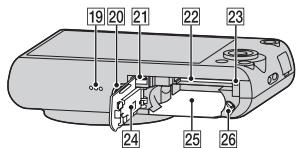
19 Speaker
20 Tripod receptacle
- Use a tripod with a screw less than 5.5mm (7/32 inches) long. Otherwise, you cannot firmly secure the camera, and damage to the camera may occur.
21 HDMI micro jack
22 Memory card slot
23 Access lamp
24 Battery/memory card cover
25 Battery insertion slot
26 Battery eject lever
* Supports Micro USB compatible device.
Inserting the battery pack
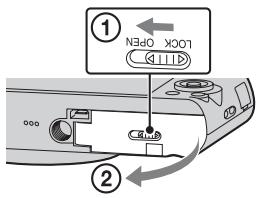
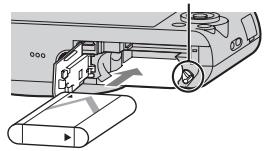
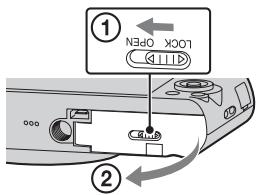
Battery eject lever
1 Open the cover.
2 Insert the battery pack.
- While pressing the battery eject lever, insert the battery pack as illustrated. Make sure that the battery eject lever locks after insertion.
- Closing the cover with the battery inserted incorrectly may damage the camera.
GB
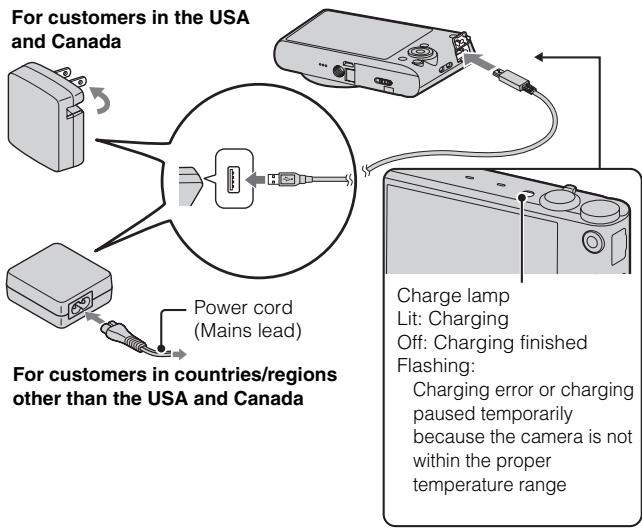
1 Connect the camera to the AC Adaptor (supplied), using the micro USB cable (supplied).
2 Connect the AC Adaptor to the wall outlet (wall socket). The Charge lamp lights orange, and charging starts.
- Turn off the camera while charging the battery.
- You can charge the battery pack even when it is partially charged.
- When the Charge lamp flashes and charging is not finished, remove and re-insert the battery pack.
Notes
- If the Charge lamp on the camera flashes when the AC Adaptor is connected to the wall outlet (wall socket), this indicates that charging is temporarily stopped because the temperature is outside the recommended range. When the temperature gets back within the appropriate range, the charging resumes. We recommend charging the battery pack in an ambient temperature of between 10^ to 30^ (50^ to 86^) .
- The battery pack may not be effectively charged if the terminal section of the battery is dirty. In this case, wipe any dust off lightly using a soft cloth or a cotton swab to clean the terminal section of the battery.
- Connect the AC Adaptor (supplied) to the nearest wall outlet (wall socket). If malfunctions occur while using the AC Adaptor, disconnect the plug from the wall outlet (wall socket) immediately to disconnect from the power source.
- When charging is finished, disconnect the AC Adaptor from the wall outlet (wall socket).
- Be sure to use only genuine Sony brand battery packs, micro USB cable (supplied) and AC Adaptor (supplied).
Charging time (Full charge)
The charging time is approximately 230min using the AC Adaptor (supplied).
Notes
- The above charging time applies when charging a fully depleted battery pack at a temperature of 25^ ( 77^ ). Charging may take longer depending on conditions of use and circumstances.
Charging by connecting to a computer
The battery pack can be charged by connecting the camera to a computer using a micro USB cable.
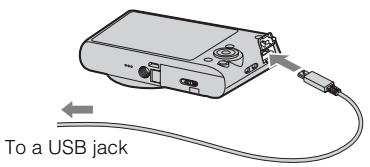
GB
Notes
-
Note the following points when charging via a computer:
-
If the camera is connected to a laptop computer that is not connected to a power source, the laptop battery level decreases. Do not charge for an extended period of time.
- Do not turn on/off or restart the computer, or wake the computer to resume from sleep mode when a USB connection has been established between the computer and the camera. The camera may cause a malfunction. Before turning on/off, or restarting the computer or waking the computer from sleep mode, disconnect the camera and the computer.
- No guarantees are made for charging using a custom-built computer or a modified computer.
Battery life and number of images that can be recorded and played back
| Battery life | Number of images | |
| Shooting (still images) | Approx. 250 min. | Approx. 500 images |
| Typical movie shooting | Approx. 80 min. | — |
| Continuous movie shooting | Approx. 120 min. | — |
| Viewing (still images) | Approx. 360 min. | Approx. 7200 images |
Notes
- The above number of images applies when the battery pack is fully charged. The number of images may decrease depending on the conditions of use.
-
The number of images that can be recorded is for shooting under the following conditions:
-
Using Sony "Memory Stick PRO Duo" (Mark2) media (sold separately)
-
The battery pack is used at an ambient temperature of 25^ (77^) .
-
The number for "Shooting (still images)" is based on the CIPA standard, and is for shooting under the following conditions:
(CIPA: Camera & Imaging Products Association) - DISP(Display Setting) is set to [ON].
- Shooting once every 30 seconds.
- The zoom is switched alternately between the W and T ends.
- The flash strobes once every two times.
- The power turns on and off once every ten times.
- The numbers of minutes for movie shooting are based on the CIPA standard, and are for shooting under the following conditions:
- Movie quality:AVC HD HQ
- Typical movie shooting: Battery life based on repeatedly starting/stopping shooting, zooming, turning on/off, etc.
- Continuous movie shooting: Battery life based on non-stop shooting until the limit (29 minutes) has been reached, and then continued by pressing the MOVIE button again. Other functions, such as zooming, are not operated.
Supplying power
The camera can be supplied with power from the wall outlet (wall socket) by connecting to the AC Adaptor, using the micro USB cable (supplied).
You can import images to a computer without worrying about draining the battery pack by connecting the camera to a computer using the micro USB cable.
In addition, you can use the AC Adaptor AC-UD10 (sold separately) or AC-UD11 (sold separately) for shooting to supply power when shooting.
Notes
- Power cannot be supplied when the battery pack is not inserted in the camera.
- Shooting is not possible when the camera is connected directly to a computer or to a power outlet using the supplied AC Adaptor.
- If you connect the camera and a computer using the micro USB cable while the camera is in playback mode, the display on the camera will change from the playback screen to the USB connection screen. Press (Playback) button to switch to the playback screen.
Inserting a memory card (sold separately)
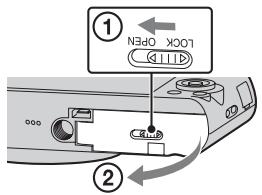
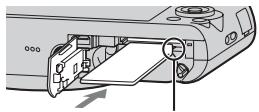
Ensure the notched corner faces correctly.
GB
1 Open the cover.
2 Insert the memory card (sold separately).
- With the notched corner facing as illustrated, insert the memory card until it clicks into place.
3 Close the cover.
Memory cards that can be used
| Memory card | For still images | For movies | |
| A | Memory Stick XC-HG Duo | ✓ | ✓ |
| Memory Stick PRO Duo | ✓ | ✓ (Mark2 only) | |
| Memory Stick PRO-HG Duo | ✓ | ✓ | |
| Memory Stick Duo | ✓ | — | |
| B | Memory Stick Micro (M2) | ✓ | ✓ (Mark2 only) |
| C | SD memory card | ✓ | ✓ (Class 4 or faster) |
| SDHC memory card | ✓ | ✓ (Class 4 or faster) | |
| SDXC memory card | ✓ | ✓ (Class 4 or faster) | |
| D | microSD memory card | ✓ | ✓ (Class 4 or faster) |
| microSDHC memory card | ✓ | ✓ (Class 4 or faster) | |
| microSDXC memory card | ✓ | ✓ (Class 4 or faster) |
- In this manual, the products in the table are collectively referred to as follows:
A: "Memory Stick Duo" media
B: "Memory Stick Micro" media
C: SD card
D: microSD memory card
Notes
- To use a "Memory Stick Micro" media or microSD memory card with the camera, be sure to insert it into a dedicated adaptor first.
To remove the memory card/battery pack
Memory card: Push the memory card in once to eject the memory card.
Battery pack: Slide the battery eject lever. Be sure not to drop the battery pack.
Notes
- Never remove the memory card/battery pack when the access lamp (page 9) is lit. This may cause damage to data in the memory card/internal memory.
Setting the clock
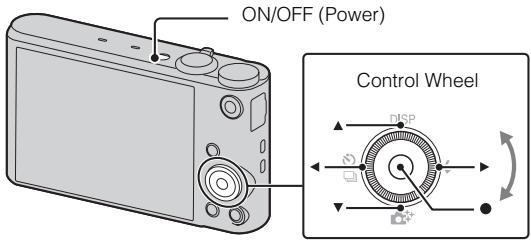
Select items: / / /
Set the numeric value of date and
time: 1/1
Set:
1 Press the ON/OFF (Power) button.
Date & Time setting is displayed when you turn on the camera for the first time.
- It may take time for the power to turn on and allow operation.
2 Select a desired language.
3 Select a desired geographic location by following the on-screen instructions, then press on the control wheel.
4 Set [Date & Time Format], [Daylight Savings] or [Summer Time] and [Date & Time], then select [OK] → [OK].
- Midnight is indicated as 12:00 AM, and noon as 12:00 PM.
5 Follow the instructions on the screen.
-
The battery pack will run out quickly when:
-
Disp. Resolution is set to [High].
GB
Shooting still images/movies
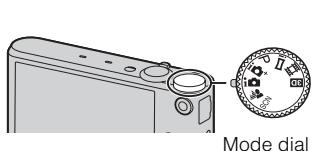
i: Intelligent Auto
: Movie Mode
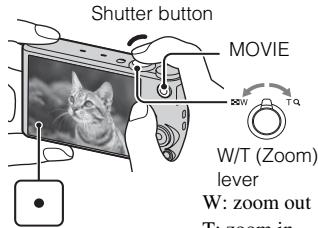
Shooting still images
1 Press the shutter button halfway down to focus.
When the image is in focus, a beep sounds and the indicator lights.
2 Press the shutter button fully down to shoot an image.
Shooting movies
1 Press the MOVIE (Movie) button to start recording.
- Use the W/T (zoom) lever to change the zoom scale.
- Press the shutter button to shoot still images while continuing to record the movie.
2 Press the MOVIE button again to stop recording.
Notes
- The sound of the lens and lever operating will be recorded when the zoom function operates while shooting a movie. The sound of the MOVIE button operating may also be recorded when movie recording is finished.
- The panoramic shooting range may be reduced, depending on the subject or the way it is shot. Therefore even when [360^] is set for panoramic shooting, the recorded image may be less than 360 degrees.
- Continuous shooting is possible for approximately 29 minutes at one time at the camera's default settings and when the temperature is approximately 25^ (77^) . When movie recording is finished, you can restart recording by pressing the MOVIE button again. Recording may stop to protect the camera depending on the ambient temperature.
- When shooting with the flash and the zoom is set to W, the shadow of the lens may appear on the screen, depending on the shooting conditions. If this happens, set the zoom to T and shoot with the flash again.
Viewing images
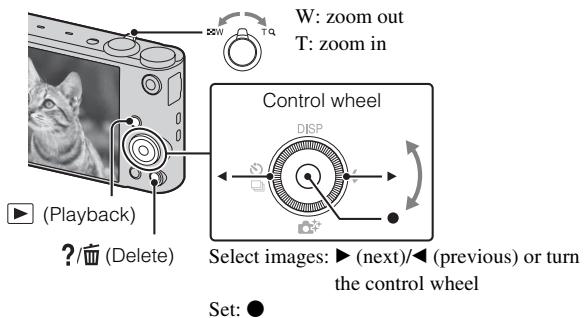
1 Press the (Playback) button.
- When images on a memory card recorded with other cameras are played back on this camera, the registration screen for the data file appears.
Selecting next/previous image
Select an image by pressing (next)/ (previous) on the control wheel or by turning the control wheel. Press in the center of the control wheel to view movies.
- Deleting an image
① Press?/血 (Delete) button.
② Select [This Image] with on the control wheel, then press .
Returning to shooting images
Press the shutter button halfway down.
GB
In-Camera Guide
This camera is equipped with a built-in instruction guide. This allows you to search the camera's functions according to your needs.
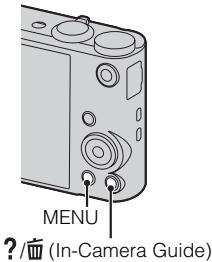
1 Press the MENU button.
2 Select the desired MENU item, then press the ?/ (In-Camera Guide) button.
The operation guide for the selected item is displayed.
- If you press the 12 (In-Camera Guide) button when the MENU screen is not displayed, you can search the guide using keywords or icons.
Introduction of other functions
Other functions used when shooting or playing back can be operated using the control wheel or MENU button on the camera. This camera is equipped with a Function Guide that allows you to easily select from the functions. While displaying the guide, you can use various functions.
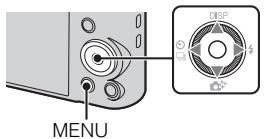
Control wheel
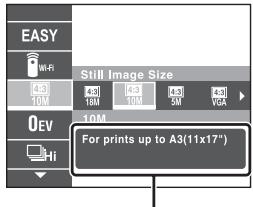
Function Guide
Control wheel
DISP(Display Setting): Allows you to change the screen display.
(S) (Cont. Shooting/Self-Timer): Allows you to use the self-timer and burst shooting mode.
( Photo Creativity): Allows you to operate the camera intuitively.
(Flash): Allows you to select a flash mode for still images.
Center button (Tracking focus): The camera tracks the subject and adjusts focus automatically even when the subject is moving.
Menu Items
Shooting
| Movie shooting scene | Select movie recording mode. |
| Panorama Shooting Scene | Select recording mode when shooting panoramic images. |
| Picture Effect | Shoot a still image with an original texture according to the desired effect. |
| Scene Selection | Select pre-set settings to match various scene conditions. |
| Easy Mode | Shoot still images using minimal functions. |
| HDR Painting effect | When [HDR Painting] is selected in Picture Effect, sets the effect level. |
| Area of emphasis | When [Miniature] is selected in Picture Effect, sets the part to focus on. |
| Color hue | When [Toy camera] is selected in Picture Effect, sets the color hue. |
| Extracted Color | When [Partial Color] is selected in Picture Effect, selects the color to extract. |
| Illustration Effect | When [Illustration] is selected in Picture Effect, sets the effect level. |
| Defocus Effect | Set the level of background defocus effect when shooting in Background Defocus mode. |
| Soft Skin Effect | Set the Soft Skin Effect and the effect level. |
| Still Image Size(Dual Rec) | Set the still image size shot while recording a movie. |
| Ctrl with Smartphone | Shoot still images and movies by controlling the camera remotely by a smartphone. |
| Send to Computer* | Back up images by transferring them to a computer connected to a network. |
| Still Image Size/ Panorama Image Size/Movie Size/ Movie Quality | Select the image size and the quality for still images, panoramic images or movie files. |
| Exposure Compensation | Adjust the exposure manually. |
| ISO | Adjust the luminous sensitivity. |
| White Balance | Adjust color tones of an image. |
| Focus | Select the focus method. |
| Metering Mode | Select the metering mode that sets which part of the subject to measure to determine the exposure. |
| Cont. Shooting Interval | Select the number of images taken per second for Burst shooting. |
| Scene Recognition | Set to automatically detect shooting conditions. |
GB
| Smile Shutter | Set to automatically release the shutter when a smile is detected. |
| Smile Detection Sensitivity | Set the Smile Shutter function sensitivity for detecting smiles. |
| Face Detection | Select to detect faces and adjust various settings automatically. |
| Anti Blink | Set to automatically shoot two images and select image in which the eyes are not blinking. |
| Movie SteadyShot | Set the strength of SteadyShot in movie mode. If you change the setting for [Movie SteadyShot], the angle of view will change. |
| In-Camera Guide | Search the camera’s functions according to your needs. |
- Displayed only when a memory card is inserted.
Viewing
| Send to Smartphone | Upload and transfer images to a smartphone. |
| View on TV | View images on a network-enabled TV. |
| Send to Computer* | Back up images by transferring them to a computer connected to a network. |
| Beauty Effect | Retouch a face on a still image. |
| Retouch | Retouch an image using various effects. |
| Picture Effect | Add various texture on images. |
| Slideshow | Select a method of continuous playback. |
| Delete | Delete an image. |
| 3D Viewing | Set to play back images shot in 3D mode on a 3D TV. |
| View Mode | Select the display format for images. |
| Display Cont. Shooting Group | Select to display burst images in groups or display all images during playback. |
| Protect | Protect the images. |
| Print (DPOF) | Add a print order mark to a still image. |
| Rotate | Rotate a still image to the left. |
| In-Camera Guide | Search the camera’s functions according to your needs. |

Setting items
If you press the MENU button while shooting or during playback,
(Settings) is provided as a final selection. You can change the default
settings on the (Settings) screen.
GB
| Shooting Settings | Movie format/AF Illuminator/Grid Line/Clear Image Zoom/Digital Zoom/Wind Noise Reduct./Red Eye Reduction/Blink Alert/Write Date/Disp. Resolution |
| Main Settings | Beep/Panel Brightness/Language Setting/Display color/ Demo Mode/Initialize/Function Guide/CTRL FOR HDMI/USB Connect Setting/USB Power Supply/LUN Setting/Download Music/Empty Music/Airplane Mode/ Eye-Fi*/Power Save/Version |
| Network Settings | WPS Push/Access point settings/Edit Device Name/ SSID/PW Reset/Disp MAC Address |
| Memory Card Tool** | Format/Create REC.Folder/Change REC.Folder/Delete REC.Folder/Copy/File Number |
| Clock Settings | Area Setting/Date & Time Setting |
- Displayed only when an Eye-Fi memory card is inserted.
** If a memory card is not inserted, (Internal Memory Tool) will be displayed and only [Format] can be selected.
Features of "PlayMemories Home"
The software "PlayMemories Home" allows you to import still images and movies to your computer and use them. "PlayMemories Home" is required for importing AVCHD movies to your computer.
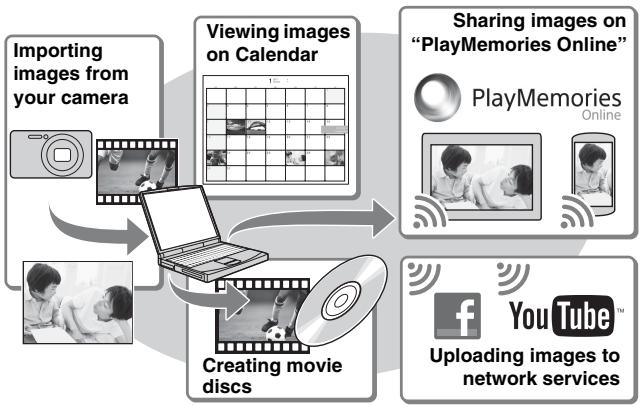

Downloading "PlayMemories Home" (for Windows only)
You can download "PlayMemories Home" from the following URL:
www.sony.net/pm
Notes
- An Internet connection is required to install "PlayMemories Home".
- An Internet connection is required to use "PlayMemories Online" or other network services. "PlayMemories Online" or other network services may not be available in some countries or regions.
- "PlayMemories Home" is not compatible with Macs. Use the applications that are installed on your Mac. For details, visit the following URL: http://www.sony.co.jp/imsoft/Mac/
■ Installing "PlayMemories Home" on a computer
1 Using the Internet browser on your computer, go to the following URL, then click [Install] [Run].
www.sony.net/pm
2 Follow the instructions on the screen to complete the installation.
- When the message to connect the camera to a computer is displayed, connect the camera and computer using the micro USB cable (supplied).
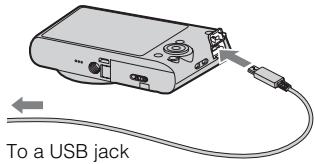
To the Multi/Micro USB Terminal
Viewing "PlayMemories Home Help Guide"
For details on how to use "PlayMemories Home", refer to the "PlayMemories Home Help Guide".
1 Double-click the [PlayMemories Home Help Guide] icon on the desktop.
- To access the "PlayMemories Home Help Guide" from the start menu: Click [Start] [All Programs] [PlayMemories Home] [PlayMemories Home Help Guide].
- For Windows 8, select the [PlayMemories Home] icon from the Start screen to start [PlayMemories Home], then select [PlayMemories Home Help Guide] from [Help] menu.
- For details on "PlayMemories Home", you can also see the "Cyber-shot User Guide" (page 2) or the following PlayMemories Home support page (English only):
http://www.sony.co.jp/pmh-se/
Number of still images and recordable time of movies
The number of still images and recordable time may vary depending on the shooting conditions and the memory card.
Still images
(Units: Images)
| Capacity Size | Internal memory | Memory card |
| Approx. 48 MB | 2 GB | |
| 18M | 7 | 295 |
| VGA | 155 | 6400 |
| 16:9(13M) | 8 | 325 |
| 16:9(2M) | 29 | 1150 |
Movies
The table below shows the approximate maximum recording times. These are the total times for all movie files. Continuous shooting is possible for approximately 29 minutes (a product specification limit). The maximum continuous recording time of an MP4 (12M) format movie is about 15 minutes (limited by the 2 GB file size restriction).
(h hour), m (minute))
| Capacity Size | Internal memory | Memory card |
| Approx. 48 MB | 2 GB | |
| AVC HD 24M (FX) | — | 10 m (10 m) |
| AVC HD 9M (HQ) | — | 25 m (15 m) |
| MP4 12M | — | 15 m |
| MP4 3M | — | 1 h 10 m |
The number in ( ) is the minimum recordable time.
- The recordable time of movies varies because the camera is equipped with VBR (Variable Bit Rate), which automatically adjusts image quality depending on the shooting scene. When you record a fast-moving subject, the image is clearer but the recordable time is shorter because more memory is required for recording.
The recordable time also varies depending on the shooting conditions, the subject or the image quality/size settings.
Notes on using the camera
GB
Functions built into this camera
- This manual describes the functions of 1080 60i-compatible devices and 1080 50i-compatible devices.
To check if your camera is a 1080 60i-compatible device or 1080 50i-compatible device, check for the following marks on the bottom of the camera.
1080 60i-compatible device: 60i
1080 50i-compatible device: 50i
- Do not watch 3D images shot with this camera for extended periods of time on 3D-compatible monitors.
- When you view 3D images shot with this camera on a 3D-compatible monitors, you may experience discomfort in the form of eye strain, fatigue, or nausea. To prevent these symptoms, we recommend that you take regular breaks. However, you need to determine for yourself the length and frequency of breaks you require, as they vary according to the individual. If you experience any type of discomfort, stop viewing the 3D images until you feel better, and consult a physician as necessary. Also refer to the operating instructions supplied with the device or software you have connected or are using with this camera. Note that a child's eyesight is still at the development stage (particularly children below the age of 6).
Consult a pediatrician or ophthalmologist before letting your child view 3D images, and make sure he/she observes the above precautions when viewing such images.
On use and care
Avoid rough handling, disassembling, modifying, physical shock, or impact such as hammering, dropping, or stepping on the product. Be particularly careful of the lens.
Notes on recording/playback
- Before you start recording, make a trial recording to make sure that the camera is working correctly.
- The camera is neither dust-proof, nor splash-proof, nor water-proof.
- Avoid exposing the camera to water. If water enters inside the camera, a malfunction may occur. In some cases, the camera cannot be repaired.
- Do not aim the camera at the sun or other bright light. It may cause the malfunction of the camera.
- If moisture condensation occurs, remove it before using the camera.
- Do not shake or strike the camera. It may cause a malfunction and you may not be able to record images. Furthermore, the recording media may become unusable or image data may be damaged.
Do not use/store the camera in the following places
- In an extremely hot, cold or humid place
In places such as in a car parked in the sun, the camera body may become deformed and this may cause a malfunction.
- Under direct sunlight or near a heater
The camera body may become discolored or deformed, and this may cause a malfunction.
- In a location subject to rocking vibration
- Near a location that generates strong radio waves, emits radiation or is strongly magnetic place. Otherwise, the camera may not properly record or play back images.
- In sandy or dusty places
Be careful not to let sand or dust get into the camera. This may cause the camera to malfunction, and in some cases this malfunction cannot be repaired.
On carrying
Do not sit down in a chair or other place with the camera in the back pocket of your trousers or skirt, as this may cause malfunction or damage the camera.
Notes on the screen and lens
The screen is manufactured using extremely high-precision technology so over 99.99% of the pixels are operational for effective use. However, some tiny black and/or bright dots (white, red, blue or green) may appear on the screen. These dots are a normal result of the manufacturing process, and do not affect the recording.
On camera's temperature
Your camera and battery may get hot due to continuous use, but it is not a malfunction.
On the overheat protection
Depending on the camera and battery temperature, you may be unable to record movies or the power may turn off automatically to protect the camera.
A message will be displayed on the screen before the power turns off or you can no longer record movies. In this case, leave the power off and wait until the camera and battery temperature goes down. If you turn on the power without letting the camera and battery cool enough, the power may turn off again or you may be unable to record movies.
On charging the battery
If you charge a battery that has not been used for a long time, you may be unable to charge it to the proper capacity.
This is due to the battery characteristics, and is not a malfunction. Charge the battery again.
Warning on copyright
Television programs, films, videotapes, and other materials may be copyrighted. Unauthorized recording of such materials may be contrary to the provisions of the copyright laws.
No compensation for damaged content or recording failure
Sony cannot compensate for failure to record or loss or damage of recorded content due to a malfunction of the camera or recording media, etc.
Cleaning the camera surface
Clean the camera surface with a soft cloth slightly moistened with water, then wipe the surface with a dry cloth. To prevent damage to the finish or casing:
- Do not expose the camera to chemical products such as thinner, benzine, alcohol, disposable cloths, insect repellent, sunscreen or insecticide.
GB
Maintaining the LCD monitor
- Hand cream or moisturizer left on the screen may dissolve its coating. If you get any on the screen, wipe it off immediately.
- Wiping forcefully with tissue paper or other materials can damage the coating.
- If fingerprints or debris are stuck to the screen of the LCD monitor, we recommend that you gently remove any debris and then wipe the screen clean with a soft cloth.
Note on wireless LAN
We assume no responsibility whatsoever for any damage caused by unauthorized access to, or unauthorized use of, destinations loaded on the camera, resulting from loss or theft.
Note on disposal/transfer of the camera
To protect personal data, perform the following when disposing of or transferring the camera.
- Format the internal memory (page 23), record images up to full capacity of the internal memory with the lens covered, and then format the internal memory again.
This will make it difficult to recover any of your original data.
- Reset all camera settings by performing [Initialize] [All settings] (page 23).
Specifications
Camera
[System]
Image device: 7.82mm (1/2.3 type)
Exmor R CMOS sensor
Total pixel number of camera:
Approx. 21.1 Megapixels
Effective pixel number of camera:
Approx. 18.2 Megapixels
Lens: Sony G 20x zoom lens
f = 4.3 mm - 86 mm( 25 mm - )
500mm (35 mm film equivalent))
F3.5 (W) - F6.5 (T)
While shooting movies (16:9):
27mm - 540mm^*
While shooting movies (4:3):
33mm - 660mm^*
- When [Movie SteadyShot] is set to [Standard]
SteadyShot: Optical
Exposure control: Automatic exposure, Scene Selection
White balance: Automatic, Daylight, Cloudy, Fluorescent 1/2/3,
Incandescent, Flash, One Push
File format:
Still images: JPEG (DCF, Exif,
MPF Baseline) compliant, DPOF
compatible
3D still images: MPO (MPF
Extended (Disparity Image))
compliant
Movies (AVCHD format):
AVCHD format Ver. 2.0
compatible
Video: MPEG-4 AVC/H.264
Audio: Dolby Digital 2ch,
equipped with Dolby Digital Stereo Creator
Manufactured under license from Dolby Laboratories.
Movies (MP4 format):
Video: MPEG-4 AVC/H.264
Audio: MPEG-4 AAC-LC 2ch
Recording media: Internal Memory
(Approx. 48 MB), "Memory Stick
Duo"media, "Memory Stick
Micro" media, SD cards, microSD memory cards
Flash: Flash range (ISO sensitivity
(Recommended Exposure Index) set to Auto):
Approx. 0.2m to 4.3m
(7 7/8 inches to 14 ft. 1 3/8 inches)
(W)
Approx. 2.0m to 2.4m
(6 ft. 6 3/4 inches to 7 ft. 10 1/2
inches) (T)
[Input and Output connectors]
HDMI connector: HDMI micro jack
Multi/Micro USB Terminal*:
USB communication
USB communication: Hi-Speed USB
(USB 2.0)
- Supports Micro USB compatible device.
[Screen]
LCD screen:
7.5cm (3.0 type) TFT drive
Total number of dots:
460 800 dots
[Power, general]
Power: Rechargeable battery pack
NP-BX1, 3.6V
AC Adaptor AC-UB10/UB10B/
UB10C/UB10D, 5 V
Power consumption (during shooting):
Approx. 1.0W
Operating temperature: 0^ to 40^ (32^ to 104^)
Storage temperature: -20^ to +60^ (-4^ to +140^)
Dimensions (CIPA compliant): 96.0mm× 54.9mm× 25.7mm (37 / 8 inches × 21 / 4 inches × 11/16 inches)W/H/D
Mass (CIPA compliant) (including NP-BX1 battery pack, "Memory Stick Duo" media): Approx. 166g (5.9 oz)
Microphone: Stereo
Speaker: Monaural
Exif Print: Compatible
PRINT Image Matching III: Compatible
[Wireless LAN]
Supported standard: IEEE 802.11 b/g/n
Frequency: 2.4GHz
Supported security protocols: WEP/WPA-PSK/WPA2-PSK
Configuration method: WPS (Wi-Fi Protected Setup) / manual
Access method: Infrastructure Mode
AC Adaptor AC-UB10/UB10B/UB10C/UB10D
Power requirements: AC 100 V to 240V 50Hz / 60Hz 70mA
Output voltage: DC 5 V, 0.5 A
Operating temperature: 0^ to 40^ (32^ to 104^)
Storage temperature: -20^ to +60^ (-4^ to +140^)
Dimensions: Approx. 50mm× 22mm× 54mm (2 inches × 7 / 8 inches × 21 / 4 inches)W/H/D
Mass: For the USA and Canada: Approx. 48g (1.7 oz) For countries or regions other than
the USA and Canada: Approx. 43g (1.5 oz)
Rechargeable battery pack NP-BX1
Used battery: Lithium-ion battery
Maximum voltage: DC 4.2 V
Nominal voltage: DC 3.6 V
Maximum charge voltage: DC 4.2 V
Maximum charge current: 1.89 A
Capacity: 4.5 Wh (1240 mAh)
Design and specifications are subject to change without notice.
Trademarks
- The following marks are trademarks of Sony Corporation.
Cybershot, "Cyber-shot," "Memory Stick XC-HG Duo," "Memory Stick PRO Duo," "Memory Stick PRO-HG Duo," "Memory Stick Duo," "Memory Stick Micro"
- "AVCHD" and "AVCHD" logotype are trademarks of Panasonic Corporation and Sony Corporation.
- The terms HDMI and HDMI High-Definition Multimedia Interface, and the HDMI Logo are trademarks or registered trademarks of HDMI Licensing LLC in the United States and other countries.
Windows is registered trademark of Microsoft Corporation in the United States and/or other countries.
Mac, App Store are registered trademarks of Apple Inc. - iOS is a registered trademark or trademark of Cisco Systems, Inc. and/or its affiliates in the United States and certain other countries.
- Android, Google Play are trademarks of Google Inc.
- Wi-Fi, the Wi-Fi logo, Wi-Fi PROTECTED SET-UP are registered trademarks of the Wi-Fi Alliance.
- DLNA and DLNA CERTIFIED are trademarks of Digital Living Network Alliance.
- SDXC logo is a trademark of SD-3C, LLC.
- "e" and "PlayStation" are registered trademarks of Sony Computer Entertainment Inc.
- Facebook and the "f" logo are trademarks or registered trademarks of Facebook, Inc.
YouTube and the YouTube logo are trademarks or registered trademarks of Google Inc.
- In addition, system and product names used in this manual are, in general, trademarks or registered trademarks of their respective developers or manufacturers. However, the TM or ® marks are not used in all cases in this manual.

Works with PlayStation®3
- Add further enjoyment with your PlayStation 3 by downloading the application for PlayStation 3 from PlayStation Store (where available.)
- The application for PlayStation 3 requires PlayStation Network account and application download. Accessible in areas where the PlayStation Store is available.
Additional information on this product and answers to frequently asked questions can be found at our Customer Support Website.
http://www.sony.net/
Printed on 70% or more recycled paper using VOC (Volatile Organic Compound)-free vegetable oil based ink.
GB
Responsible : Sony Electronics Inc.
Adresse: 16530 Via Esprillo, San Diego, CA 92127 E.-U.
(CIPA: Camera & Imaging Products Association)
(h (heures), m (minutes))
| CapacitéTaille | Mémoire interne | Carte mémoire |
| Environ 48 Mo | 2 Go | |
| AVC HD 24M (FX) | — | 10 m(10 m) |
| AVC HD 9M (HQ) | — | 25 m(15 m) |
| MP4 12M | — | 15 m |
| MP4 3M | — | 1 h 10 m |
Works with PlayStation®3
A: "Memory Stick Duo"
B: "Memory Stick Micro"
C: scheda SD
D: schedadi memoria microSD
Note
Fermi imagine 3D: conforme a MPO (MPF Extended (Disparity Image))
Filmati (modulo AVCHD): Formato AVCHD Ver. 2.0 compatible
Video: MPEG-4 AVC/H.264
Audio: Dolby Digital 2ch con Dolby Digital Stereo Creator
Cyber-shot, "Cyber-shot", "Memory Stick XC-HG Duo", "Memory Stick PRO Duo", "Memory Stick PRO-HG Duo", "Memory Stick Duo", "Memory Stick Micro"
Works with PlayStation®3
(CIPA: Camera & Imaging Products Association)
Works with PlayStation®3
(h (horas), m (minutes))
Works with PlayStation®3
Konfigurationsmethode: WPS (Wi-Fi Protected Setup)/manuell
Works with PlayStation®3
Configuratiemethode: WPS (Wi-Fi Protected Setup) / handmatig
Cybershot, "Cyber-shot",
"Memory Stick XC-HG Duo", "Memory Stick PRO Duo", "Memory Stick PRO-HG Duo", "Memory Stick Duo", "Memory Stick Micro"
Works with PlayStation®3
Elementary apparatus
Spust migawki
2 Pokretlo trybu
i (Inteligntna automatyka)/
(MPF Extended (Disparity Image))
Filmy (format AVCHD):
Zgodny z formatem AVCHD
wer. 2.0
Video: MPEG-4 AVC/H.264
Audio: Dolby Digital 2 kan.,
Works with PlayStation®3
Sony Europe Limited, The Heights, Brooklands, Weybridge, Surrey, KT130XW, United Kingdom
PL
Works with PlayStation®3
A membranous cystitis (BCC) is a rare entity that is characterized by the presence of a single or multiple cystic lesion in the bladder. It is usually associated with a history of bladder cancer, and it is also common in patients with bladder cancer.
Cyber-shot, "Cyber-shot", "Memory Stick XC-HG Duo", "Memory Stick PRO Duo", "Memory Stick PRO-HG Duo", "Memory Stick Duo", "Memory Stick Micro"
Works with PlayStation®3
SCN(Scene Selection)/
Background Defocus)
3 Snimanie: páčka
W/T (Priblizenie)
Prezeranie: páčka
(Miniaturne nahfady)/ páčka Q (Priblizenie poças prehravania)
4 Blesk
[5] Kontrolka samospuste/ Kontrola režimu snimania ušmevu/AF iluminator
6 Kontrolka nabijania
Tlacidlo ON/OFF (Napajanie)
8 Mikrofón
9 Objektiv
10 Displej LCD
11 Tlacidlo (Prehravanie)
12 Tlačidlo MOVIE (Videozáznam)
13 Multi/Micro USB koncovka
14 Hacik na remienok na zapastie
15 Prijjima Wi-Fi (vstavany)
16 Otočné ovládač
17 Tlacidlo MENU
18 Tlacidlo?/ (In-Camera Guide/Vymazaf)
19 Reproduktor
20 Objímpa pre statív
- Použivajte statív so skrutkou kratSou než 5,5 mm. V opacnom pripadse sa fotoparát nebude daf riadne upevnif a moze sa poskodit.
21 Mikro konektor HDMI
22 Slot pre pamáfvókarto
23 Kontrolka pristupu
24 Kryt priestoru pre batériu/ pamàtvó kartu
25 Priestor pre vlozenie baterie
Páčka uvohnenia bátérié
Podporuje zariadenia kompatbilné rozhráním Micro USB.
Vkladanie baterie
| Shooting Settings | Movie format/AF Illuminator/Grid Line/Clear Image Zoom/Digital Zoom/Wind Noise Reduct./Red Eye Reduction/Blink Alert/Write Date/Disp. Resolution |
| Main Settings | Beep/Panel Brightness/Language Setting/Display color/Demo Mode/Initialize/Function Guide/CTRL FOR HDMI/USB Connect Setting/USB Power Supply/LUN Setting/Download Music/Empty Music/Airplane Mode/Eye-Fi*/Power Save/Version |
| Network Settings | WPS Push/Access point settings/Edit Device Name/SSID/PW Reset/Disp MAC Address |
| Memory Card Tool** | Format/Create REC.Folder/Change REC.Folder/Delete REC.Folder/Copy/File Number |
| Clock Settings | Area Setting/Date & Time Setting |
Prikon (pochasnmania): Pribl. 1,0 W
Works with PlayStation®3
Ziskajte dalsie potesenie z konzoly PlayStation 3 po prevzati aplikacia pre konzolu PlayStation 3 z obchodu PlayStation Store (ak je k dispozicii).
- Ak chcete prevziaf aplikáciu pre PlayStation 3, musite mat učet na PlayStation Network. Dostupné v oblastiach, kde je k disposići PlayStation Store.
Visa "Hjalpguide for PlayMemories Home"
Mer information om hur du anvander "PlayMemories Home" fãr du om du lãser "Hjälpguide for PlayMemories Home".
Works with PlayStation®3
Works with PlayStation®3
(h (time), m (minutt))
| Kapasitet Størrelse | Interninne | Minnekort |
| Ca. 48 MB | 2 GB | |
| AVC HD 24M (FX) | — | 10 m (10 m) |
| AVC HD 9M (HQ) | — | 25 m (15 m) |
| MP4 12M | — | 15 m |
| MP4 3M | — | 1 h 10 m |
Tallet i parentes viser minsteverdien for opptakstiden som er tilgengelig.
Cybershot, "Cyber-shot", "Memory Stick XC-HG Duo", "Memory Stick PRO Duo", "Memory Stick PRO-HG Duo", "Memory Stick Duo", "Memory Stick Micro"
Works with PlayStation®3
(h (timer), m (minutter))
| Kapacitet Størrelse | Intern hukommelse | Hukommelseskort |
| Ca. 48 MB | 2 GB | |
| AVC HD 24M (FX) | — | 10 m (10 m) |
| AVC HD 9M (HQ) | — | 25 m (15 m) |
| MP4 12M | — | 15 m |
| MP4 3M | — | 1 h 10 m |
Antal effective pixels for kameraet: Ca. 18,2 megapixels
Objektiv: Sony G 20× zoomobjektiv
f = 4,3 mm - 86 mm (25 mm - 500 mm (svarende til 35 mm film))
F3,5 (W) - F6,5 (T)
Under optagelse af film (16:9): 27 mm - 540 mm*
Under optagelse af film (4:3): 33mm - 660mm^*
- Nár [Steadyshot for film] er indstillet til [Standard]
SteadyShot: Optisk
Konfigurationsmetode: WPS (Wi-Fi Protected Setup) / manuel
Adgangsmetode: Infrastrukturtilstand
Lysnetadapter AC-UB10/ UB10B/UB10C/UB10D
Strömkrav: Vekselström 100 V til 240 V, 50 Hz/60 Hz, 70 mA
Works with PlayStation®3
Works with PlayStation®3
- Povecajte uzivanje u upotrebi uredaja PlayStation 3 preuzimanjem aplikacije za PlayStation 3 iz trgovine PlayStation Store (gdje je dostupna).
- Za aplikaciju za PlayStation 3 potrebno je stvoriti račun PlayStation Network i preuzeti aplikaciju. Dostupno je na podrucjima gdje je PlayStation Store dostupan.
HR
Dodatne informacije o ovom
proizvodu i odgovori na
najcešca pitanja mogu se naci na
internetskim stranicama tvrtke
Sony za podršku korisnicima
(Sony Customer Support Website).
http://www.sony.net/
Ispisano na 70% ili vishe recikliranom papiru s tintom na bazi biljnoga ulja bez VOC-a (Volatile Organic Compound).
HR
Mai multe despre aparatul Foto ("Ghid de utilizes Cyber-shot")
Works with PlayStation®3
(CIPA: Camera & Imaging Products Association)
-To DISP ( ) eivα vθμσεν oε [NAI].
- Λημη μια φογα καθε 30 δεντερόλεπτa.
-To 2ovu maetaaalaaeau evaalaae uaeiaov W xai T.
-To a avaβει οτορβοσαποια μia φογα καθε δύν φογες.
-Htgofooioa eveyoioeita xia aneevoyoioeita ia fogaa08dexa 00e5.
O aotuoos wv aeov yia thn tavias baoicetai oto ngotvo CIPA xuaowbeiyia nyn vro ts naqaxato ovvnhxε:
-Поштета taiviaц:AVC HD HQ
-Tuixin 1 taivias: H diaguaia zwo hs nts maataiaac avaoepetai o e ouvojnes eravelnnmuevns evaengs/diaoxoian5 hyns, covu, eveyyootoiong/aeeeyyotooings xI.
-Suvexn taivac:H diagxieia ts nataqias avaqetaa o e xoig diaxoit mexu va eintevoyei to doio (29 5eTov) xai,
XaTov, o ouvexion tnc me atnma tvoxouuov MOVIE gava.
Oi alles leitovuyies, onos to couv, dev xonouotoiuvtau.
Iapoxn pεμatoc
1 NatnoTe to Koumu (Avanapaywy).
- Otav avanagayovta oavtnv xapeo evox tsx agtas mnuinnsovexov ygammae me aee xapees, ephiicetai n oovn xataxogians yia to axio deodovw.
Enioynεπoενnc/nponyouεvncεikovac
Works with PlayStation®3
- to PlayStation 3 , PlayStation 3 to PlayStation Store( ) .
H epaqoyngammaToPlayStation 3 aataei evav loayaguao oTo PlayStation Network kau nI ayuyn ts epaqoyng.Eivcu duaeoum oe nequoxg onov uvaqex to PlayStation Store.
Pioo0eTe5nnoofooie5
Oxyixaue to pooiov auTo xu
aavntoeic oe ovxv6
eogtnoei muogeite va bgeite
oto diadixtuao toto
VoootqIeN 1eAatov ma.
http://www.sony.net/
Ekturnufo 70% npiaoTopeo avakukufo xapti eXpno nlaivou baiaouevo avtika elaia, noue iemepieei IPOI (TNTtikc Opyavikec Evwaeic).
Eupwaikn Eyyunon SONY
Ayamnte nAatn,
Sac evxagotovneov ayogoadate
avto to npoiov nT Sony. EAnicovue
va meivete avvtonouveo ato th
xonjou.tn Tnv anilovn neiottwnow
pou to npoiov oac xeuaotei oepis
(Enoxwe)xtata th diapceua tns
eynuong, naqaxaleite va
enwovnoote me to xataotma
ayogac nmu eva maoos to bixtvov
Esoovodortoeuvov oepics (ASN)
tnc Evogwaixz Oixovomux Zovns
(EOZ) nxa aalovxogovov
avafoqvota o' autn thy vnyunon n
ota uvoobdvovta autlvphiadba
(IIeioxKakvyns ng Eynons).
Mtoogeit va bejeite aeontopoegees yia
ta meaIoutov dixtvov maC ASN, otouc
tnkefovivxovzataLoyous, otouc
xataLoyov npovotov maXa otis
totooieideae ma. Ta va atofoyete
aade pigtnt talatwqia, oas
ouviototye va daabaoetene pooeetua
to eyxoidio xonjons npotov va epetee
ee taof ne tv opounthevtao nhto
dixtroe esoovodotneevov oepicus.
H Eyyunon ΣaS
H aagovoa eyyon oxye yia to
yoioi ng Sonyou ayogoadate,ep
oooy katetoi avapegeta otta
oovadaia oovvodoeav to yoioid
oag,vnoTnyoovtoeOn ot
ayogostne Evtos nTgPiogxns
Kaalvns Eeyongs.
GR
Me tnv npoovoa, n Sony eyrvataot to npoov eviva aataaayevo ao xae elattwa oxyeouevo ta va liua n tv naataoxevn yua ma aegiodo ENOS EOTYs ano tv npoognuia ts ayxuic ayogac. H agodaa vna vaoopoeai kai extianooei tv npoogbo eyyon, etaegia Sony, eivai autn nov avapeeta o' autyiv tv Eeyon n oto ovobov etuvn fvllado ot tn wooa oetau eixiozeta n enioeyn vata n diagxa tns eyyon. Eav, evtos npiiooov eyyonig, atoebxiei aleattawatuxo to poiov (xata thy npoovnia ts axoyin cayogac) loyw axatalanowvlaxov n xataoxevn, n Sony n eva eiloos tout dxtov Eeqoodotmiov SScb ASN tns Piooxyk Kalvngts Eeyonno 0a enioevoei n 0a avzataotro (vat 'enoloynt SONY) xooic enjbaovun y aoyatixn n atvataxua, to npoiov n ta elattomua xgaoqtnata tou, evtoc eivoyou xovou, baoei tow qowv kai ouvwhovn tov extiethvta naqaxaw. H Sony xaa t a mIoToudtov Eeqoodotmeov SScb ASN uovovva vaxzataotmoov e gaoqtnata me vea n avazvkaueva ngovtva n gaoqtnata Ola ta npoiovta xai egqtnata Tou exov avzataotaeeiyovtai idoxtnoia ts Sony.
'Opoi
- Euaeevdsdvuae i npaovoa 8yunong th aqaoyovta moo eva npoaojmothei to pnooturo tmuolyo y n anodoei nwlnong (me tvn Evdei n ts nuogounyias ayogac, to mvteIov tv npoiovtoc xaa nT eWvuaiaosu Tmupogou) maie t o elattoumatio npoiiov vtGns nepoodov eyyunong. H Sony xaa ta meiNtoudtivou Egoovodotneuv EoBIs ASN npoovoa va aovnOov tv ngeov Euaoxevn zata nTv peiodo 8yynuoeawcav dev npooovuoiv ta npoavacegoeva yagapa h eav dev npoxuittuvnto avta u naq npoogvia ayogac, to npoiov n to mvtoLToPNOVTOG nEtvvuaia ovauoA OAOVA 8yuyn eov ou v tucot tvnvov L o equaxoc aiglooc tv npoiovtoc exaakowei diaygaei, apagebe i xataotei duovavaywotoc.
2.Γa va aonopevz0e1βαβn nawLεiα / dyawφησ oαφωμενa n aotouwéva μoδa nξαgntuata aotohjeuvc δδoEvov, opeλεte va ta apαoεoet πvτaodωoet to pioovocγειoκvnta Tpvπεiodo yevyunq
3.H a o o eYyonm dEVAaUnte ta EoDaa taouc uavduovus metapaooc nO ovvoeovta mE tetapaoaTou poiovtoacqo5 xai anT Sony h MeLo Tov duKtov ASN.
4.HaogobaaeyyonnDevxaiuTae ta e:
Piouoovrtnenonxau eioxevn aivataotaon eaojntavov axoteloeqa ovooioyuqf 000a
Avaia (ovotua iepn yta otoia npoβEeTa nqioDbn avzataotaan rata tn diaoxia cng evos npoiovtro osm unavaofoctoe mataaqie,phioyia extruwoong, yoadic,lambdaes,xaiodia xI).
Znua n eattouata nov 10000000av loyw xonjns, 1aetovoyiaic neiouoov aovbetaov m tyn vaoovian atouwn i oocwnxonj
Znuei 日 aalayes oTo npoiov Tov
Tpoxlanqnuav aio:
KaxiXgion, ouaeuaaovouevov:
*tovxuogouovnueiqeiv ouaon n euaevauwncnaa aocnooovn baa 0e oovc yvog xovatalaw
* mavovn n m oBpovn
m tO odnyie Tg Sony
yAratotaon n XoTOn Tou
Tooiovntc
* mouvtjnoiou oioiovtos oupwva e Tc odnyies oowtng ouvtjnois Tns Sony
* yxataotaon n xonon tov
poioivotos me toofo m
oumuov o ie ts teyixie
pooiayoaes ra ta
pootvana aopalaiaig nov
oxuvov orn xogaoorov exu
xyataotaabei ka
xonouoioeita to poiov.
Molvaos aotovs hon tov qoovtoc me loyouo tov dev paoexetare to t oioiy kavdoev n yataaon tov loiaouzov.
TnV xataotaon tTa
Eaattoumaatov ovoTnmuatow
Me ta otia xoanaotoietra n
Ota otioia evooatoveto
Tpoiov extos aAo alla
Pooiovta ts Sony edixa
oxeduaeva yia va
xogouoioovvtae me to ev
loywooiov.
XoJOnTov pOoiovToeEaQoTnuaTa, pOepeaeiaXoOlaOmo xai ala oioivTaTw OIOOWOTuOg, nXaTaOaTmXaTOpOtvTO dev ovvoTovTa ano T Sony.
Eπωxενη η εαχειηθείασ
εικενηι έτος τοῦν δεν
εῖαι μέλη τής Sony η του
δυτύνους ASN.
Pvthetaiaei n 000aouyec xoigtn yonoyouevn yaoyn oovaaoteon ts Sony, ot otoie ouptquaabavovta:
* naovabαθuŋ tov πoovivtos πega ato ts πoobayagés ᵓ ta ωaαaxgwtixa πov πeγαqóvotua 0τ Σχειidio xηη
* o tqoTOnaouoeis tov
TQoiOyToe oOTo va
ovmuogfothei0g eBvIXeS
toxixe texVxue
TQoDiayOafoes xia TOpTuA
oAoAeiacovoyo
XooEs yia ts OTOie To
TQoiOv dev iEe oxeduaotei
xai kataoxveotaet iOxa.
□ A
A tvxueta, xovaxa, yog a, xnuke xaaalcc ovioies, pnuuqa, dovnoeig, vtebouxn theoounta, axatalnao eaoquo, vtetaon, vtebouxn n eoalmeyn toofoobooia na taon eooov, actiovobla, nextoogotataxc exeeveooei oupteauauavoyov tov xegauov, alowv eoioteovov dvuaueov kai endoaoev.
5.H naovoa eeyunon kaivtetmu ovo ta vuaa meo nov npoiovoc. 2ev xaivtte to loyouxoo (eite ts) Sony, te tiovv xataoxoeavotow) yia to oioaoeexet a nojoeetaw va iyoovoe ma adoeia xionge ato tv teauo xjoitn h xogotec dnaowei eyyuongn e gaeqoei aotnv yevynon.
Egaipeaic kai πeipiooi
Me eaiogon tov oov avapoeovta
avotego, no Sony de aagexia xiaia
eyunon (qntn, awonen, ex tov oov
n nnooov apogaa tnv aoitata, tvh
eidoon, tn ayoigua, tn yaoiortia,
tny kataaIooTota to npoiOvtos n
tov loayoukov no aegyeta at
ovodevte to poyov, yia
ovyezquveo evoto. Ecv n oxyvoa
vootheia arayogevei Iwos n
peoicx tsn aayooia eaiogene, n
Sony eae i neoogiei tvn eyynoi
tno mv onyviotn extaon tov
entepetne i noxyovoa vooheioia.
Otaioditote eyynuon n otoia dev
eaeitea anowos (oto metoo tvo to
entepenta o ovuyovoc) 0a
teogicctea on dtaqxaia oovc ts n
paoovac eyyuongia.
H movadixv vtoxoeown Tc Sony
ouvaue n tvn paoovaaeynuon
eiva n euaoxevn n avtxataotaon
pooivotovw ovuovceovt oovs
oogucxa uovthnxes n 5yuyunong. H
Sony dev evthetavatya otaoabndnote
aoviaea n qnauaov atetaae ta
pooivota, to oepic, tvn paoovaa
eyvunon, oumteqaauabavoewov tow
oavovmaov xa avawatowevov, tow
tuajatocov xatafaanqne yia nty
ayoga tov pcoiovtos, n aowlaiae
xedov, eooaidatoc, deooyevov,
aotaavouni n xohonr vtooiovvtos n
otowovntote ovvedeqevov
pooivotw-vn cquons,
aogeumttovooae n enaoalovthns
aowlaiae n cniuaac axn av avnt
n aowlaea n cnina aphiopa oe:
MweweynLeitovyia n mLeitovgya Tou pioiOvToN oovdeedevov ngoioytwov Lwykattowatov n mdiatheouotac xata nTneigodo vuro tboqioxetau stony n e eelosou dxtvov ASN, nooia npoxaloe diaoxon diaeouotac tou pioiOvToG, aWaleia Xoovov XoOnt n daxoTn Tg Egyaiac.
Piaoxivavaxqioov
(\pi \lambda \eta \phi \phi o\phi \omega \nu \tau \upsilon \zeta \eta \tau \theta \eta \kappa a\nu
a\sigma \tau \to \pi \sigma o i o\nu \dot{\eta}\alpha \dot{\tau}\sigma
o\nu v\delta e\delta e\nu e\nu \pi o o i o\nu t\alpha .)
□Znuaa aotawiaa loyouwov npoyogmuatovn apqououevov moeov ato0thevovs6de0eovv
Moivoeis aio wus h auwes artie.
Taavotogowoyovnu aawoleesxua
Cnueus, vou xovceivata oe oednhorte
yevixc agxcs dauioi,
oumuauabavopoeivns tnc aieeias n
aakov adzoxoaiov, aetnojns
oubaon, ontn h ouwtnoig
eyvnoi, xaa oaovtovuvnvns
axopa xia yia thema tya ta oioia n
Sony n meoctov dxztovs ASN exei
ebodtoinhei yia tn dvatotnta
poxoknng tetoov nuwoh
2to metoov no woyovoa vovooia
atayovoevi neoogicntve ts
eagaeic euvvvn, n Sony egaei n
neogoiqni tvvovn igmo ot
meyotn extaon nov ts eitogeine n
wyovbova vovooia. Ta naqadeyua,
peqa qanr anayovoevovn Tny
eagoeon tv vepoquoog cnoovovn
oepoiota oe aleua, oe bqiia
aeiaea, oe ex aootews
paattoja, oe doxo anaqoouies
paeis. Se xapia peiattwn, n
evvboynT syo xata tvn paovoa
eyvnon, dev vtegbaive tv tnnov
xatafahthne yia tv ayogta dov
piogiovtos, wotoo av npxovoa
voopeoia entipente movo
peooguovc evvovovnuolotegov
baohou, th axovov u televtaioi.